OpenClaw Android 앱 구조 분석: 모바일 node와 operator 클라이언트
OpenClaw Gateway와 Android app 사이의 operator/node 세션 흐름, 주요 컴포넌트, node.invoke 실행 구조, Chat과 Voice 처리 방식, local model 포함 여부를 소스 기준으로 정리한다.
OpenClaw Android 앱은 얼핏 보면 모바일 AI 앱처럼 보인다. 하지만 소스를 보면 중심은 조금 다르다.
이 앱은 Android 기기 안에서 LLM을 직접 돌리는 앱이 아니라, OpenClaw Gateway에 붙는 모바일 node + operator 클라이언트다. 사용자는 Chat, Voice, Settings 같은 UI를 앱에서 보지만, 모델 실행과 agent orchestration의 중심은 Gateway 쪽에 있다. Android 앱은 그 Gateway에 연결되어 채팅 UI를 제공하고, 동시에 카메라, 위치, 알림, 연락처, 캘린더 같은 Android 기능을 agent가 호출할 수 있는 node.invoke 도구로 노출한다.
분석 기준은 공식 저장소의 Android 코드다. 확인한 커밋은 85ee7122, 2026-06-29 기준이다.
한 장으로 보는 메인 흐름
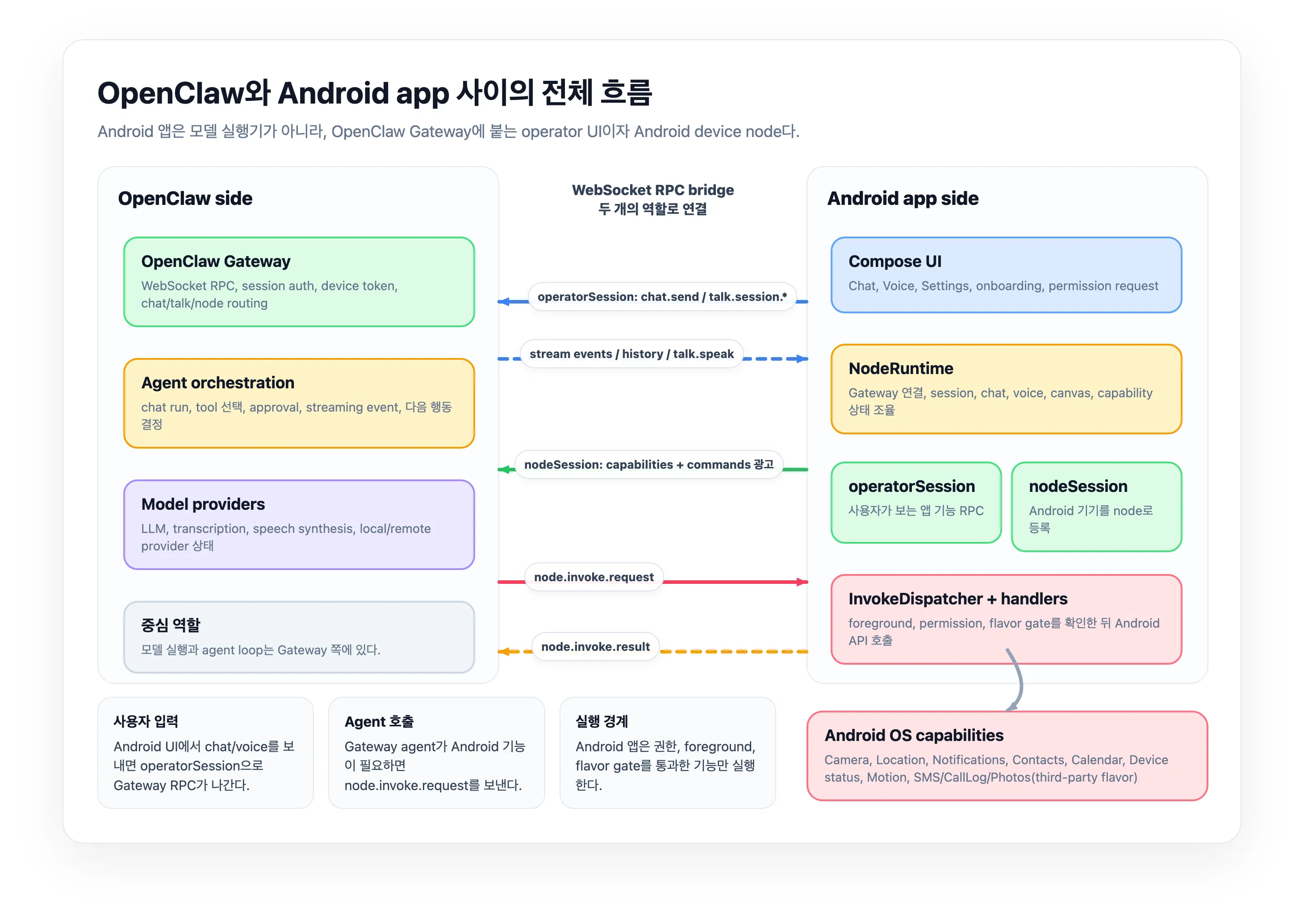
이 글에서 가장 먼저 봐야 하는 구조는 Android 앱 내부 컴포넌트가 아니라 OpenClaw Gateway와 Android app 사이의 왕복 흐름이다.
Android 앱은 Gateway에 두 역할로 붙는다. operatorSession은 사용자가 앱에서 하는 chat, voice, model 조회, session 관리 같은 UI RPC를 Gateway로 보낸다. 반대로 nodeSession은 Android 기기를 Gateway의 device node로 등록하고, 현재 열 수 있는 capability와 command를 광고한다.
그래서 agent가 Android 기능을 쓰는 방향도 일반적인 모바일 AI 앱과 다르다. 사용자가 앱에서 질문을 보내면 Gateway의 agent/model 쪽으로 흐르고, agent가 카메라, 위치, 연락처, 캘린더 같은 Android 기능이 필요하다고 판단하면 Gateway가 다시 앱으로 node.invoke.request를 보낸다. Android 앱은 InvokeDispatcher에서 foreground, permission, product flavor gate를 확인한 뒤 가능한 기능만 실행하고 node.invoke.result를 돌려준다.
이 구조 때문에 OpenClaw Android 앱의 핵심은 “폰 안에서 어떤 모델을 돌리는가”가 아니라, Gateway와 어떤 권한으로 연결되고 Android capability를 어떤 조건에서 agent에게 열어주는가다.
앱 내부 구조
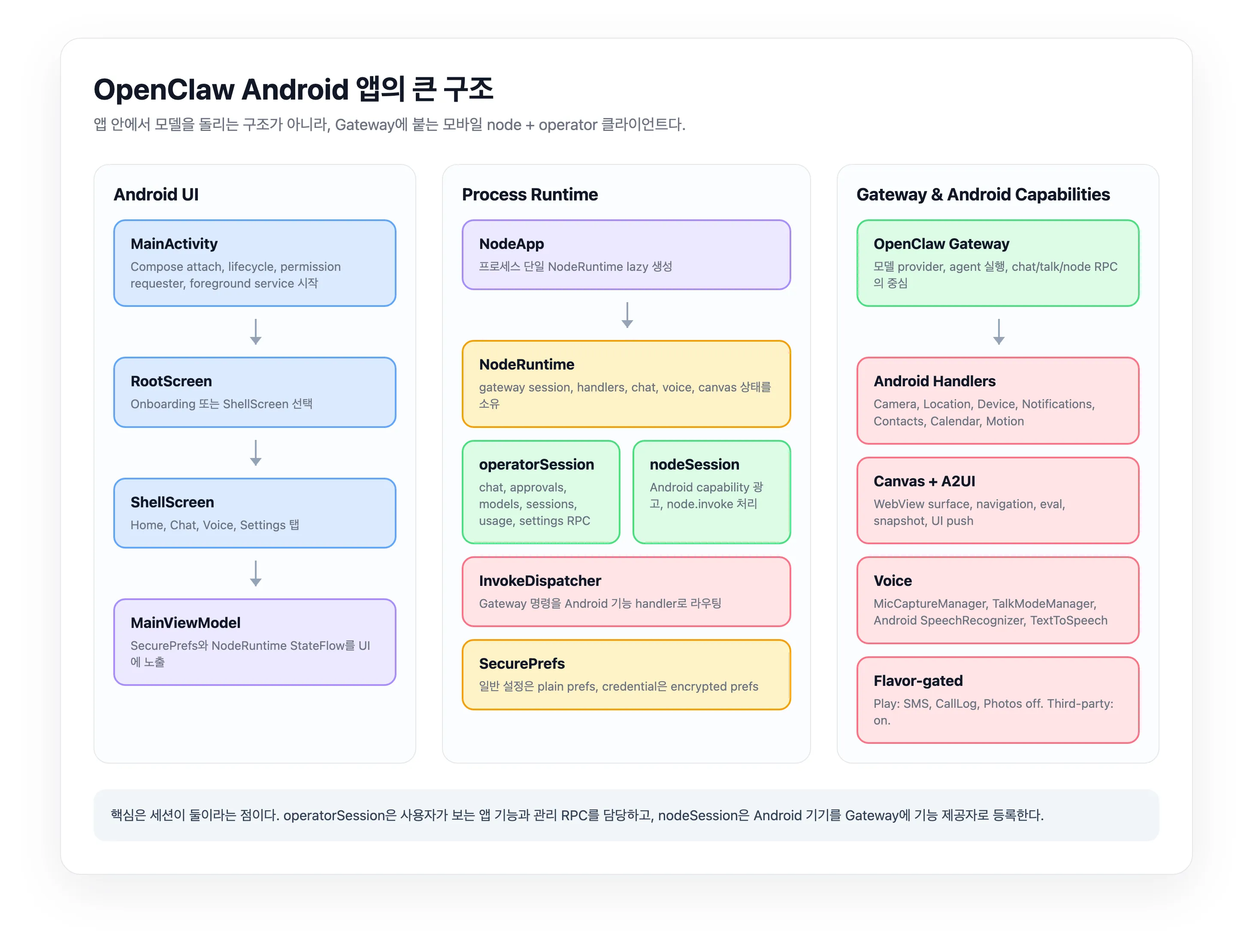
앱 내부 구조는 다음 네 계층으로 나눌 수 있다.
첫째, MainActivity와 Compose UI 계층이다. 앱 시작, lifecycle, permission requester, foreground service 시작을 담당한다.
둘째, MainViewModel이다. 이 클래스는 실제 로직을 직접 많이 수행하기보다 SecurePrefs와 NodeRuntime의 상태를 StateFlow로 UI에 노출하는 facade에 가깝다.
셋째, NodeRuntime이다. Android 앱의 핵심 런타임이다. Gateway discovery, TLS trust, WebSocket session, chat, voice, canvas, Android capability handler를 소유한다.
넷째, GatewaySession과 InvokeDispatcher다. GatewaySession은 WebSocket RPC 연결을 관리하고, InvokeDispatcher는 Gateway에서 들어온 node.invoke.request를 Android 기능 handler로 라우팅한다.
세션이 둘이다
이 앱을 이해할 때 가장 중요한 지점은 Gateway 연결이 하나가 아니라는 점이다.
operatorSession은 사용자가 보는 앱 기능을 담당한다. Chat, sessions, approvals, model catalog, usage, skills, health logs 같은 Gateway RPC가 이 경로를 탄다. 앱 입장에서는 “조작자 UI”에 가까운 세션이다.
nodeSession은 Android 기기를 Gateway에 node로 등록한다. 여기서 앱은 자신이 제공할 수 있는 capability와 command 목록을 Gateway에 알린다. 이후 Gateway나 agent가 Android 기능을 쓰고 싶으면 node.invoke.request를 보내고, 앱은 실행 결과를 node.invoke.result로 돌려준다.
이 분리 덕분에 앱은 한편으로는 채팅 클라이언트이고, 다른 한편으로는 Android 기기 기능을 agent에게 제공하는 도구 서버처럼 동작한다.
연결과 호출 흐름
말로 나열하면 연결과 호출 흐름이 단순한 단계 목록처럼 보인다. 하지만 실제 구조는 sequence로 보는 편이 낫다. 첫 단계는 Gateway에 붙는 handshake다.
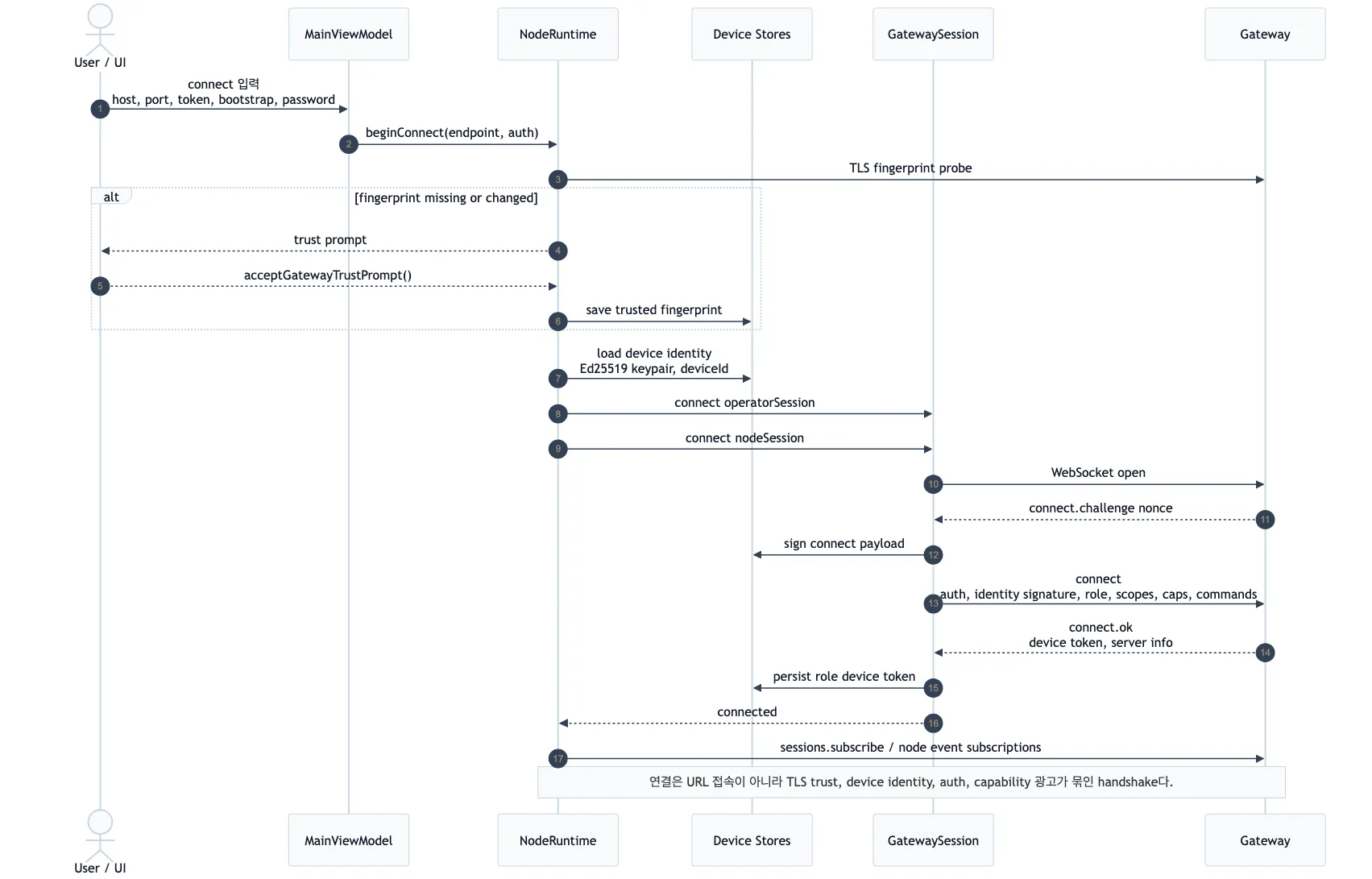
연결은 단순히 URL에 WebSocket을 여는 절차가 아니다. 사용자가 Gateway 정보를 입력하면 NodeRuntime이 endpoint를 만들고, TLS fingerprint를 확인한다. 처음 보는 인증서이거나 fingerprint가 바뀐 경우에는 trust prompt를 거친다. 이후 GatewaySession이 connect.challenge를 받고, device identity signature, auth payload, role, scope, capability, command 정보를 담아 connect를 보낸다.
여기서 중요한 점은 operatorSession과 nodeSession이 역할별로 열린다는 것이다. operatorSession은 사용자가 보는 앱 기능을 위한 경로이고, nodeSession은 Android 기기가 Gateway에 capability 제공자로 등록되는 경로다.
두 번째 단계는 agent가 Android 기능을 호출하는 node.invoke 흐름이다.
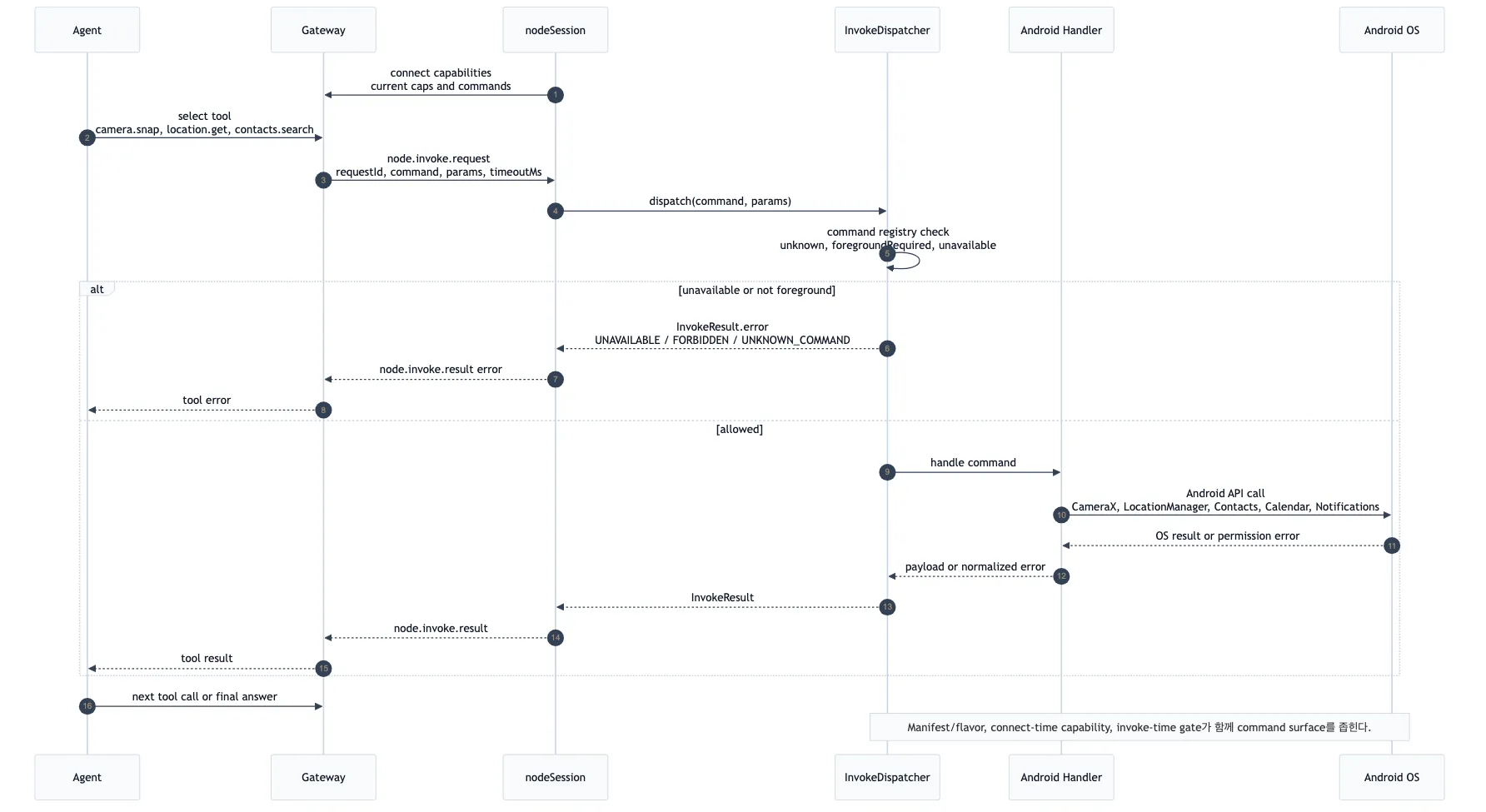
node.invoke.request는 곧바로 Android OS API로 가지 않는다. 먼저 GatewaySession이 requestId, command, params, timeout을 파싱하고, InvokeDispatcher가 command registry를 확인한다. 그 다음 foreground requirement, runtime permission, feature flag, product flavor 같은 실행 시점 gate를 다시 검사한다.
통과한 요청만 실제 Android handler로 넘어간다. 예를 들어 camera.snap은 camera handler로, location.get은 location handler로, contacts.search는 contacts handler로 간다. Canvas 관련 명령은 foreground WebView surface가 필요하기 때문에 앱이 background 상태면 실패하도록 gate가 걸려 있다.
결과는 다시 node.invoke.result로 Gateway에 돌아가고, agent는 그 결과를 보고 다음 tool call을 하거나 최종 답변을 만든다.
주요 컴포넌트
MainActivity는 Compose UI를 붙이고 MainViewModel을 활성화한다. 흥미로운 점은 runtime 초기화를 첫 프레임 뒤로 미룬다는 것이다. encrypted prefs, identity, gateway setup이 처음 렌더링을 막지 않도록 한 설계다.
MainViewModel은 UI와 runtime 사이의 완충층이다. runtimeState() 패턴으로 runtime이 아직 만들어지지 않았을 때도 UI가 안정적인 초기값을 볼 수 있게 한다. onboarding이 끝나고 foreground로 들어오면 NodeRuntime을 lazy start한다.
NodeRuntime은 가장 큰 중심 객체다. GatewayDiscovery, GatewaySession, ChatController, MicCaptureManager, TalkModeManager, CanvasController, 각종 Android handler를 묶는다. 앱 전체가 사실상 이 런타임을 중심으로 움직인다.
GatewaySession은 OkHttp WebSocket 기반 RPC 세션이다. connect, reconnect, auth failure pause, request/response matching, event dispatch, node.invoke 결과 전송까지 담당한다.
InvokeDispatcher는 Android 기능 command router다. 지원하는 기능은 Canvas, Camera, Location, Device, Notifications, System Notify, Talk/PTT, Photos, Contacts, Calendar, Motion, SMS, CallLog, Debug다.
SecurePrefs는 일반 설정과 credential 저장을 분리한다. display name, camera enabled, location mode 같은 값은 일반 SharedPreferences에 두고, Gateway token/password 같은 민감 값은 EncryptedSharedPreferences에 둔다.
NodeForegroundService는 Android OS에 연결 상태와 microphone capture 상태를 foreground service notification으로 노출한다. Talk mode나 manual mic capture가 켜지면 foreground service type에 microphone이 포함된다.
코드 상세 분석
Android 소스는 ui, node, gateway, voice, chat, protocol 패키지로 나뉜다. 파일 수 기준으로는 ui가 가장 크지만, 아키텍처의 중심은 NodeRuntime, GatewaySession, InvokeDispatcher다. 테스트도 node, gateway, voice, chat에 집중되어 있어 실제 위험 경계가 어디인지 드러난다.
MainActivity는 앱을 바로 무겁게 띄우지 않는다. 첫 Compose frame을 그린 뒤 NodeApp.prefs를 background에서 준비하고, 그 다음 MainViewModel을 활성화한다. runtime이 준비된 뒤에야 camera lifecycle owner, permission requester, SMS permission requester, foreground service를 붙인다. 초기 화면 렌더링과 Gateway/runtime 초기화를 분리한 구조다.
MainViewModel은 runtimeState()라는 패턴으로 NodeRuntime의 StateFlow를 Compose가 바로 구독할 수 있는 형태로 감싼다. runtime이 아직 없을 때도 Offline, 빈 model list, 빈 chat list 같은 안정적인 초기값을 제공한다. 이 덕분에 UI는 runtime 생성 시점에 덜 민감하다.
NodeRuntime은 앱의 composition root다. 여기서 GatewayDiscovery, DeviceIdentityStore, DeviceAuthStore, operatorSession, nodeSession, ChatController, MicCaptureManager, TalkModeManager, CanvasController, 각 Android handler가 만들어진다. 기능별 객체는 나뉘어 있지만 session 연결, capability 광고, event fan-out, foreground 상태, voice capture mode 전환은 NodeRuntime이 중앙에서 조율한다.
GatewaySession은 WebSocket RPC 세션이다. 연결 직후 connect.challenge nonce를 기다리고, device identity signature와 auth payload를 포함한 connect 메시지를 보낸다. auth는 device token, shared token, bootstrap token, password, none 중에서 선택된다. 연결 성공 시 Gateway가 내려준 device token은 role별로 저장되고, auth 실패 사유에 따라 reconnect를 계속할지 멈출지 판단한다.
TLS 처리는 일반적인 hostname 검증만 쓰는 구조가 아니다. Gateway endpoint가 TLS를 요구하면 Android는 certificate fingerprint를 probe하고, 처음 본 fingerprint나 변경된 fingerprint에 대해 trust prompt를 띄운다. 사용자가 승인한 fingerprint는 이후 pin처럼 사용된다. 로컬 cleartext bootstrap과 원격 TLS endpoint의 보안 수준을 다르게 취급하는 점도 중요하다.
nodeSession은 현재 앱이 제공할 capability와 command를 Gateway에 광고한다. 이 광고는 단순 static list가 아니라 preference, runtime permission, hardware availability, product flavor를 반영한다. 예를 들어 camera가 꺼져 있거나 권한이 없으면 camera command가 빠지고, Play flavor에서는 SMS, call log, photos가 구조적으로 비활성화된다.
InvokeDispatcher는 두 번째 방어선이다. Gateway에 command를 광고했더라도 실제 호출 시 다시 foreground requirement와 availability gate를 검사한다. Canvas와 camera는 foreground가 필요하고, location, photos, motion, SMS, call log, installed apps는 각각 permission이나 feature flag를 다시 확인한다. 결과적으로 command surface는 “manifest, connect 광고, invoke 실행 시점”의 세 단계로 좁혀진다.
Android 기능 handler는 반환 크기와 시간도 제한한다. camera.snap은 JPEG 크기를 제한하고, camera.clip은 duration과 raw payload 크기를 제한한다. photos.latest, contacts.search, calendar.events, callLog.search, device.apps도 limit 상한을 둔다. agent가 기기 API를 호출하는 구조라서, 이런 제한은 보안뿐 아니라 Gateway 안정성에도 중요하다.
Play flavor와 third-party flavor 차이
민감 기능은 product flavor에 따라 다르다.
Google Play용 play flavor에서는 SMS, call log, photos가 꺼져 있다.
반대로 thirdParty flavor에서는 SMS, call log, photos가 켜져 있다.
따라서 “소스 코드에 SMS handler가 있다”와 “Play Store 앱에서 SMS 기능이 동작한다”는 같은 말이 아니다. Play 배포판 기준으로는 Google Play restricted permission 정책을 피하기 위해 민감 기능이 비활성화되어 있다.
Chat은 로컬 모델이 아니라 Gateway RPC
Chat UI는 ChatController가 담당한다. 사용자가 메시지를 보내면 앱은 optimistic user message를 먼저 UI에 추가한 뒤, operatorSession으로 chat.send RPC를 호출한다.
답변 stream, run status, pending tool call, history refresh도 Gateway event와 RPC를 통해 갱신된다. Android 앱 안에 agent loop나 LLM runtime이 있는 구조가 아니다.
Voice도 local LLM 구조가 아니다
Voice에는 두 가지 흐름이 있다.
MicCaptureManager는 Android microphone에서 audio frame을 읽어 Gateway의 talk.session.create, talk.session.appendAudio, talk.session.close 흐름으로 보낸다. transcription 결과가 오면 이를 chat send로 연결한다.
TalkModeManager는 realtime talk mode, audio capture, playback, Android SpeechRecognizer, Android TextToSpeech를 다룬다. Gateway의 talk.speak가 audio를 주면 앱이 재생하고, 실패하거나 사용할 수 없으면 Android 시스템 TTS fallback을 쓸 수 있다.
중요한 점은 이것도 앱 내부 LLM이 아니라는 것이다. Android 앱은 audio capture와 playback을 맡고, 모델 기반 처리는 Gateway provider 쪽으로 넘어간다.
Voice 경로를 더 자세히 보면
수동 mic capture는 Android AudioRecord에서 8kHz PCM16 frame을 읽고, 이를 PCMU로 변환해 talk.session.appendAudio로 보낸다. frame queue는 오래된 frame을 버리는 방식으로 backpressure를 처리한다. 음성 UI가 오래된 오디오를 뒤늦게 재생산하지 않도록 live transcription에 맞춘 설계다.
transcription event는 talk.event로 돌아온다. partial은 live transcript로 보이고, transcript는 queue에 들어간 뒤 chat.send로 이어진다. chat event의 runId는 idempotency key와 연결되어, 다른 세션이나 다른 요청의 stream이 voice UI에 섞이지 않게 막는다.
Talk mode는 별도다. realtime 모드에서는 talk.session.create에 mode: realtime, transport: gateway-relay, brain: agent-consult를 보낸 뒤 24kHz PCM16 audio frame을 계속 relay한다. Gateway가 audio chunk를 보내면 Android는 AudioTrack streaming으로 재생한다. 재생 중에는 microphone frame append를 억제해 스피커 출력이 다시 입력으로 들어가는 문제를 줄인다.
PTT 명령은 talk.ptt.start, talk.ptt.stop, talk.ptt.cancel, talk.ptt.once로 열려 있다. Android SpeechRecognizer가 transcript를 만들고, stop 시점에 chat turn으로 넘긴다. once는 침묵 감지나 timeout으로 자동 종료된다.
assistant 음성 출력은 우선 Gateway의 talk.speak를 호출한다. response가 PCM, mp3, opus, wav, webm 같은 Android 재생 가능 형식이면 앱이 재생한다. provider 미설정, provider unsupported, method unavailable 같은 경우에는 Android 시스템 TextToSpeech로 fallback한다.
local model이 있는가?
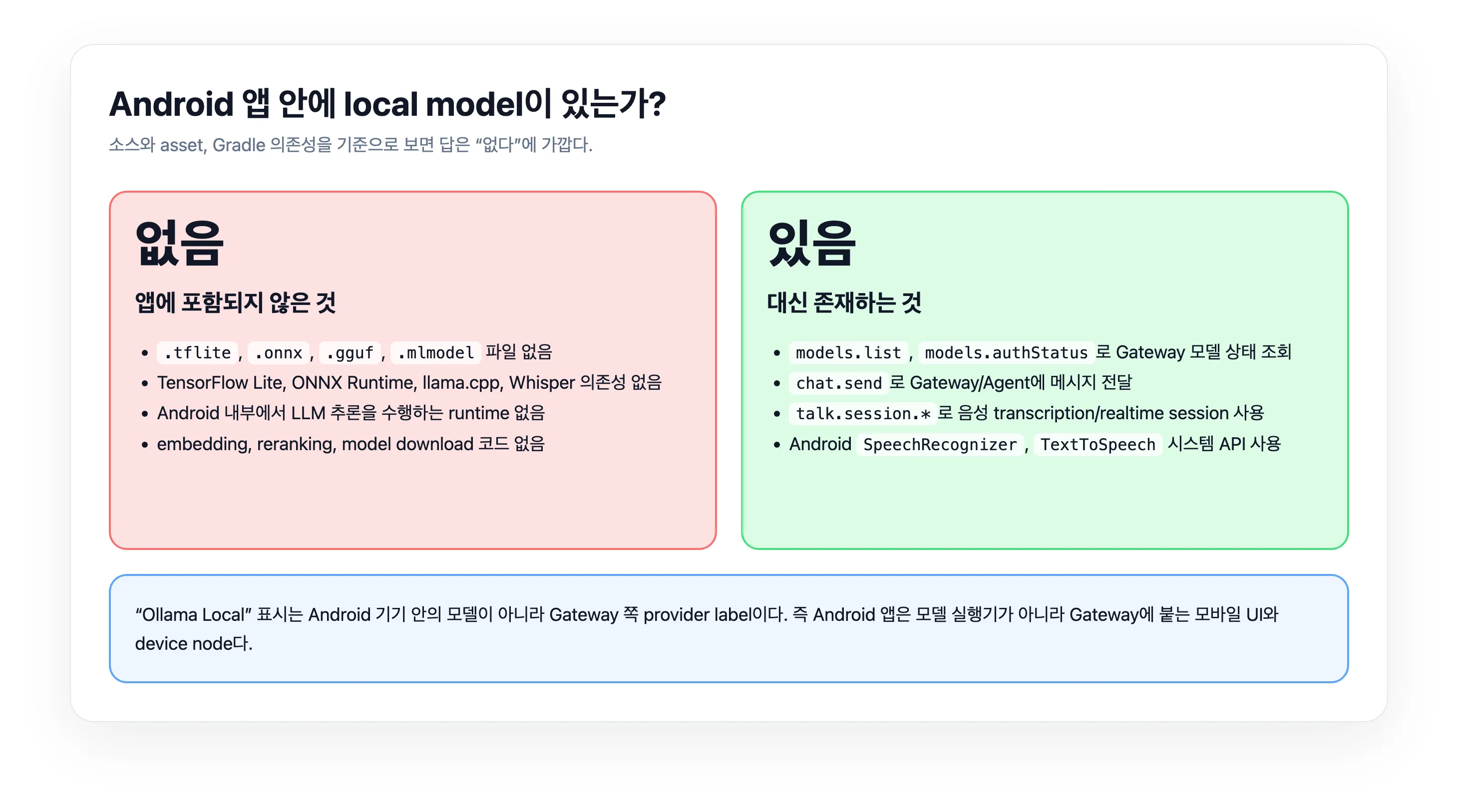
소스 기준으로 보면 Android 앱 안에는 자체 local LLM, embedding model, Whisper, ONNX, TFLite 모델이 없다.
확인한 내용은 이렇다.
.tflite,.onnx,.gguf,.mlmodel,.task같은 모델 파일이 없다.- TensorFlow Lite, ONNX Runtime, llama.cpp, Whisper, MediaPipe 같은 local inference 의존성이 없다.
- 모델 다운로드나 model path 관리 코드가 없다.
- embedding, reranking, local LLM inference를 Android에서 직접 수행하는 코드가 없다.
대신 앱은 Gateway에 models.list, models.authStatus를 호출해 provider와 model 상태를 조회한다. 코드에 "ollama-local"이라는 label이 보이지만, 이것은 Android 기기 안의 모델이 아니라 Gateway 쪽 provider 표시다.
Android 시스템 API인 SpeechRecognizer와 TextToSpeech는 사용한다. 다만 이것은 OpenClaw 앱이 자체 모델을 포함한다는 뜻이 아니다. OS나 사용자의 기기 설정에 따라 시스템 음성 엔진이 온디바이스 처리를 할 수는 있지만, OpenClaw Android 앱 자체가 모델 파일을 들고 추론하는 구조는 아니다.
정리
OpenClaw Android 앱은 모델 실행기가 아니다.
더 정확히는 OpenClaw Gateway에 붙는 모바일 UI이자 Android device node다.
사용자는 앱에서 Chat과 Voice를 쓰지만, LLM 실행, provider 선택, agent orchestration은 Gateway 쪽에 있다. Android 앱은 연결, 인증, 권한, foreground service, WebSocket RPC, Android capability execution을 맡는다.
그래서 이 앱의 보안과 사용성을 볼 때 핵심 질문은 “어떤 local model을 쓰는가”가 아니라, Gateway와 어떤 권한으로 연결되는가, 어떤 Android capability를 광고하는가, 어떤 command가 foreground/background에서 허용되는가다.